

AI in Aesthetics: Personalized Treatment Plans
AI can help sort skin data and flag risk, but the clinician still decides the plan. In Canadian clinics, a safe AI-supported consult comes down to four steps: collect clean image and intake data, match concerns to treatment options, get clear consent, and have a licensed clinician review every suggestion.
Here’s the short version:
- Good input matters most. Poor lighting, makeup, missed supplements, or patchy history can skew results.
- AI helps with pattern review. It can score redness, texture, pigment, hydration, and ageing signs by facial zone.
- Not every suggestion should be used. A clinician may accept, change, or reject it based on skin type, barrier status, allergies, meds, pregnancy, infection, or scarring history.
- Consent must come first. Clients should know what data is collected, how it is used, who sees it, where it is stored, and how long it stays on file.
- Photos and model training need separate permission. Marketing use and AI training use should never be bundled into general consent.
A few points stand out. Systems using 9-spectrum imaging can show both surface and subsurface issues. Fitzpatrick typing helps guide laser and IPL safety. And if a clinic uses third-party software, that data flow should be explained in plain language before analysis starts.
If I had to boil the whole process down, it would be this: clean data in, human review in the middle, documented consent before use, and clinician sign-off at the end.
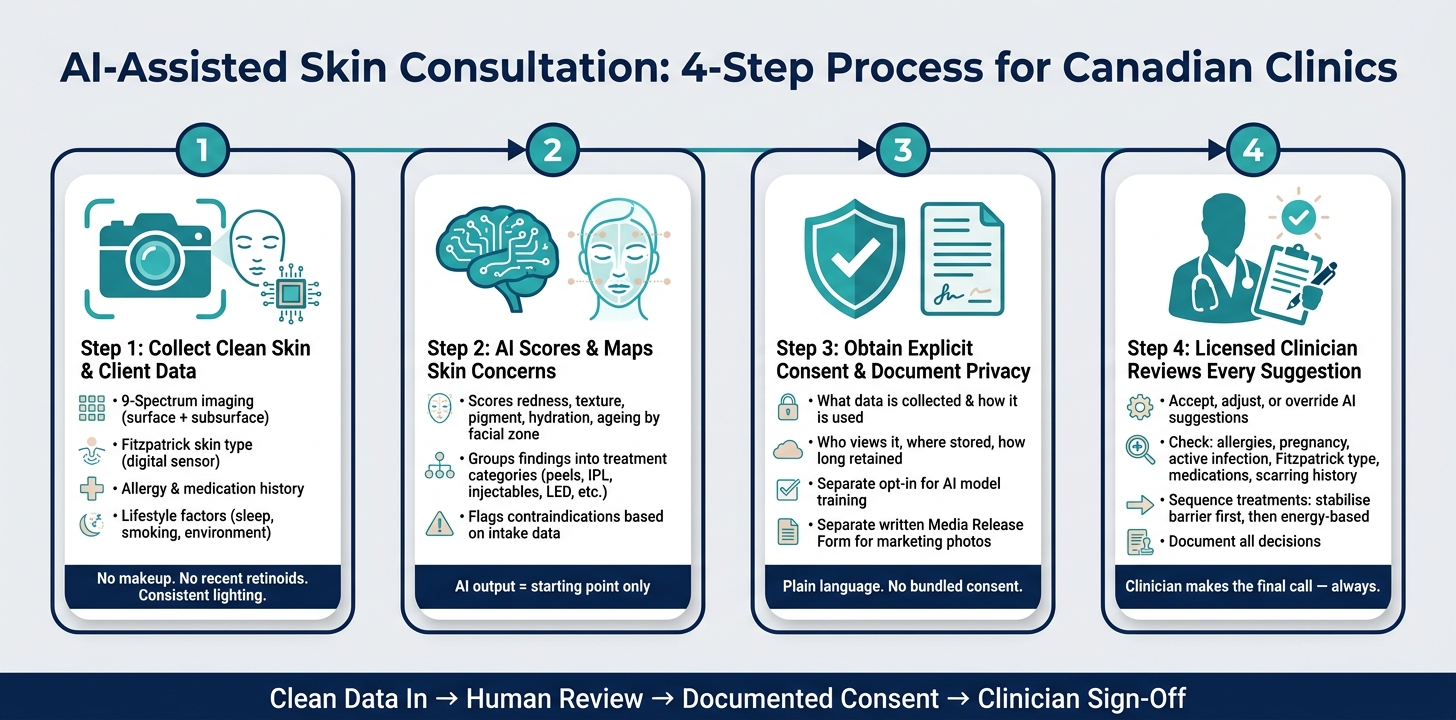
AI-Assisted Skin Consultation: 4-Step Process for Canadian Clinics
How AI Skin Analyzers Are Transforming Skincare Consultations in 2026
sbb-itb-8ec3e54
Step 1: Collecting the Right Skin and Client Data
Start with standardised skin and client data. If this part is patchy, everything that follows gets shakier. Bad intake doesn't just slow the process down. It can lead to recommendations that miss key concerns or point the client in the wrong direction.
Skin Data Inputs That Shape AI Analysis
Good imaging sits at the centre of AI-supported planning. Professional-grade analysers with 9-spectrum imaging technology can pick up both surface and subsurface concerns, including acne, pigmentation, UV damage, and early ageing markers that don't show under standard lighting. In short, standardised 9-spectrum imaging gives the system a much clearer view of what's happening in the skin.
Image quality has a direct effect on output accuracy. If the client's head position changes, room light interferes, or they arrive wearing makeup, the scan can be thrown off. For a clean baseline, clients should come in with a clean face, no makeup, and no recent retinoid or AHA use.
Fitzpatrick skin type is another key input. AI uses it to calibrate recommendations for energy-based treatments such as IPL or laser. If you're using a digital Fitzpatrick sensor, test the same area twice before logging the result. That small check can help avoid bad readings. And image data on its own isn't enough. Intake history is what tells you whether the output is safe to act on.
Client History That Must Be Reviewed Before Any Recommendations
AI can't safely pull medical history from images alone. That job still belongs to the intake process. Before any AI analysis runs, the clinic needs documented:
- allergies, including fish and salmon
- current medications and supplements such as aspirin, fish oil, and vitamin E
- previous aesthetic procedures
- any history of keloid scarring
- lifestyle factors such as sleep, smoking, weight fluctuations, makeup habits, and dry or air-conditioned environments
That history has to be captured before the system can produce recommendations the clinic can use.
Workflow Table: From Intake to Usable Data
| Input Type | How It's Collected | Why It Matters for Planning | Common Data Quality Issues |
|---|---|---|---|
| Facial Images | 9-Spectrum AI Analyser | Detects subsurface pigmentation, acne, and ageing markers | Poor lighting; inconsistent head tilt or angle |
| Skin Tone (Fitzpatrick) | Digital Fitzpatrick Sensor | Determines safe energy levels for laser/IPL; prevents burns | Testing only one area; sensor interference from ambient light |
| Allergy & Medication History | Digital Intake Form | Flags contraindications such as fish and salmon allergies and blood-thinning agents | Incomplete disclosure of supplements like fish oil or vitamin E |
| Barrier Health | Hydration and sensitivity assessment | Assesses sensitivity and hydration before recommending peels or lasers | Recent use of harsh exfoliants skewing baseline readings |
| Previous Treatments | Client Interview & Records | Prevents over-treating areas recently exposed to laser or radiofrequency | Clients forgetting dates of last injectable or energy-based treatment |
| Lifestyle Factors | Intake Questionnaire | Provides context for sleep, weight fluctuations, makeup habits, and environmental stressors | Subjective reporting; missing detail on environmental stressors |
Once intake data is standardised, AI can start mapping concerns to treatment categories.
Step 2: How AI Maps Skin Concerns to Treatment Options
With standardised intake data, AI can score findings, map them by zone, and line them up for clinician review. The next step is turning those outputs into treatment categories.
AI Outputs: Scoring, Mapping, and Treatment Suggestions
AI analysis doesn't just flag a concern. It quantifies it. Instead of leaving the clinician with a vague impression, it turns inputs into measurable outputs, like a redness score, firmness score, and similar metrics. That makes review faster and gives the clinician something concrete to work with. For example, a high erythema score in the cheek area tells the practitioner that barrier repair should come before any energy-based treatment.
The software can also map concerns to specific facial zones. It may show that the periorbital area has early laxity while the mid-face shows volume loss, then flag each zone on its own. That level of anatomical detail matters when you're deciding where to shift injection placement or how to set laser energy levels. Some systems also factor in lifestyle inputs.
Those scores then move into the treatment mapping step.
Grouping Skin Concerns Into Treatment Categories
AI then groups findings into treatment categories.
| Skin Concern | AI Detection Method | Potential Treatment Category |
|---|---|---|
| Pigmentation | UV fluorescence, subsurface melanin mapping, spot severity scoring | Chemical peels, IPL, brightening topicals, laser therapy |
| Acne | Surface reflection analysis, microbial balance, sebum levels | LED light therapy, salicylic acid treatments, professional extractions |
| Redness | Hemoglobin mapping, sensitivity scoring, vascular pattern analysis | Soothing facials, vascular lasers, barrier-repair protocols |
| Texture / Pores | Surface smoothness analysis, pore size measurement, dead skin layer detection | Microdermabrasion, dermaplaning, microneedling |
| Ageing Signs | Wrinkle depth analysis, firmness/elasticity scoring, skin age estimation | Injectables (fillers/toxins), radiofrequency, skin tightening |
| Hydration | Sensor-based analysis, low moisture levels, high transepidermal water loss | Barrier-repair serums, hydration protocols |
This gives the clinician a clear starting point and helps shape a safer treatment sequence.
Decision Table: When to Accept, Adjust, or Override AI Suggestions
AI output is a starting point. The clinician still has to weigh each suggestion against the full picture, including things the software can't see.
| AI Suggestion | When to Accept | When to Adjust | When to Override |
|---|---|---|---|
| High-intensity laser | Subsurface imaging shows deep pigmentation with a stable barrier. | Mild sun damage present; reduce intensity settings. | AI redness index is high; prioritise anti-inflammatory repair first. |
| Topical PDRN or exosomes | Standard ageing or texture concerns in healthy skin. | Client has sensitive skin; reduce frequency to every other day. | Active skin infection or known marine-derived ingredient allergies. |
| IPL / Laser Therapy | Fitzpatrick I–IV with clear pigmentation goals. | Presence of mild photodamage; adjust intensity settings. | Fitzpatrick VI; high risk of burns or complications. |
| Aggressive resurfacing | High severity score for texture and deep pigmentation in healthy skin. | Recent sun exposure or an impaired barrier not captured by AI. | Active inflammation or a recently compromised barrier. |
| Targeted Acne Treatment | AI identifies high microbial activity or specific inflammatory reflections. | Client history shows sensitivity to specific active ingredients (e.g., benzoyl peroxide). | Wood's lamp reveals an underlying fungal infection requiring medical referral. |
| Standard HA Filler | AI mapping shows volume loss in the mid-face. | The goal is radiance rather than structural change; consider Skinvive or Profhilo. | The clinician identifies a structural concern rather than skin laxity alone. |
One practical point on sequencing: AI systems often surface every concern at the same time, but that doesn't mean all of them should be treated at once. In practice, clinics need to follow a logical order. Stabilise the barrier first, then move to high-energy or regenerative treatments. That lowers complication risk.
That is why AI-assisted planning must sit inside a clear consent and privacy process.
Before any recommendation is used, the clinic must review consent and data handling.
Step 3: Consent, Privacy, and Safe Use in Canadian Clinics
Once AI links skin concerns to treatment paths, consent and privacy come first. Before any AI tool reviews a skin image or intake form, clinics need explicit consent and a clear explanation of how the data will be used. In other words, AI-assisted planning adds privacy and consent duties before any analysis starts.
What Clients Should Consent to Before AI-Assisted Analysis
AI systems look at facial images and skin features, so clinics should treat this like biometric-like processing that calls for explicit consent. Clients need to know four things from the start:
- what data is being collected
- how it will be analysed
- who can view it and where it is stored
- how long it will be kept
If a third-party vendor processes client data, clinics need to say so. If data will be used to train the model, that needs a separate opt-in. And if before-and-after photos will be used for marketing, education, or social media, clinics need a separate, specific written Media Release Form. That should never be tucked into general consent.
Consent should also make it clear that a licensed clinician reviews every output. And the wording matters. Use plain, everyday language, not dense legal boilerplate, so the client knows what they're agreeing to.
Privacy Table: Data Collected, Purpose, and Consent Points
Use the checklist below to document what is collected and why.
| Data Type | Reason Collected | Privacy / Consent Consideration |
|---|---|---|
| Facial Images (RGB/3D) | AI mapping of wrinkles, pores, and pigmentation | Explicit consent required for biometric-like processing and storage; disclose third-party access if applicable |
| Health History Forms | Screening for allergies, medications, and contraindications | Sensitive medical data; access should be limited and clearly disclosed |
| Biometric Analysis Data | Scoring skin health and suggesting treatment categories | Disclose the AI system's reliability limits and confirm that a clinician reviews all outputs |
| Treatment Records | Tracking results and refining future AI-assisted plans | Subject to provincial record retention standards; clients may request access to their records |
| AI Training Data | Improving model accuracy across skin tones | Requires a separate opt-in if data is used beyond the individual consultation |
| Marketing / Media Photos | Before-and-after documentation for educational or promotional use | Requires a separate, specific written Media Release Form |
AI devices and recommended products must meet Health Canada requirements. Clinics should also check with their insurers to confirm coverage for AI-assisted decision-making.
Once consent and privacy are documented, the clinician can finalise the treatment plan in Step 4.
Step 4: Human Judgment, Final Plan, and Clinic Implementation
Where Clinician Expertise Leads the Final Decision
At this stage, the intake is done, the data is mapped, consent is in place, and privacy steps are covered. Now the AI output has to become a plan that a clinician is willing to stand behind.
AI can flag risk and suggest options. The clinician makes the final call.
The safety review is not optional. Use the AI report to sort out what should wait, what needs to change, and what should be treated first. This table acts as the clinic filter for accepting, changing, or overriding AI suggestions.
| Category | Checkpoint | Action if Present |
|---|---|---|
| Allergies | Fish allergy | Absolute contraindication for PDRN |
| Medical Status | Pregnancy or breastfeeding | Delay |
| Skin Condition | Active infection, herpes, or severe acne | Delay until resolved |
| Skin Type | Fitzpatrick Type VI | Avoid IPL and other high-risk energy-based treatments |
| Medications | Blood-thinning agents and supplements such as aspirin and fish oil | Review and pause before treatment per clinic protocol |
| History | Keloid tendency or abnormal scarring | Adjust or override AI |
Sequencing matters too. And this is one area where clinical judgment can't be swapped out for software. Treat inflammation first, then rebuild. The practitioner decides the order, timing, and depth of each step based on the full clinical picture.
Fitting AI Into Daily Clinic Workflows
For this to work day after day, clinics need standardised tools and routines. That keeps the final review steady from one visit to the next.
Staff should be trained on the exact AI tools the clinic uses. Imaging setups should be standardised so skin data can be compared across visits without guesswork. Documentation protocols also need to be clear, so every AI output and every clinician decision is recorded.
Objective assessment tools help lock in a documented baseline before energy-based treatments start. That can include a Woods Lamp UV Skin Analyzers or a Digital Fitzpatrick Scale Skin Tone Tester. Beauty Pro Supplies Canada carries both, along with training resources to help clinics standardise these steps across their team.
Conclusion: Organised Data, Consistent Planning, Better Client Outcomes
Organised data and clinician judgement lead to safer, more precise treatment plans.
FAQs
How accurate is AI skin analysis?
AI skin analysis can give precise readouts on concerns such as pores, wrinkles, pigmentation, and hydration. How well it performs comes down to two things: the imaging system behind it and the quality and range of the clinical data used to train it.
That makes it a strong support tool for treatment mapping and personalization. But it doesn't replace a trained professional. The final treatment plan still depends on human judgment.
Can AI recommend the wrong treatment?
Yes. AI can suggest the wrong treatment because its output depends on the data it gets and the rules behind the system.
In aesthetics, AI works best as a clinical decision support tool, not the final call. A human still needs to review the recommendation, check the client’s history, and spot details the system might miss.
What should I do before an AI skin consult?
Before an AI skin consult, share clear, accurate details about your skin. That usually includes recent photos, your current skincare routine, the products you use, and any history that could affect care, such as past treatments, allergies, sensitivities, reactions, and your goals.
Then review the plan you’re given and provide clear consent before moving ahead. It’s also smart to ask how your information will be stored, protected, and used. And for safety, a human clinician should review the plan, confirm it, and make any changes needed so the final treatment fits your skin properly.
Leave a comment