

Warehouse Inventory Software for Beauty Supplies
If your warehouse software can’t track SKU, bin, lot, expiry, and order status at the same time, stock errors will show up fast. In beauty supply warehousing, that often means overselling, short-dated stock, pick errors, and late shipments across both e-commerce and wholesale.
If I had to boil this article down, I’d say the software needs to do 7 jobs well:
- Keep clean item records for every SKU, barcode, size, shade, pack, and cost in C$
- Map warehouse locations by bin, shelf, aisle, and storage zone
- Split stock by status like available, reserved, inbound, damaged, and recalled
- Track lots and expiry dates at receiving, then apply FEFO or FIFO
- Use barcode scans for receiving, putaway, picking, packing, and cycle counts
- Sync e-commerce and wholesale orders into one live stock picture
- Connect shipping and accounting with tax rules for GST, HST, and PST
A few points stand out right away:
- Beauty warehouses often handle thousands of SKUs
- Small variant errors matter, especially with shades, sterile items, and temperature-sensitive stock
- A live system helps stop one sales channel from selling stock already promised to another
- Same-day shipping rules, such as 2:00 p.m. AST cutoffs, need to be built into the order flow
- Go-live works better when opening stock, barcode links, device setup, and permissions are checked first
Here’s the article in one simple view:
| Area | What the software must control | Why it matters |
|---|---|---|
| Product data | SKU, barcode, variant, unit, supplier, cost | Cuts down on item mix-ups |
| Warehouse map | Bin, shelf, aisle, secure zone | Tells staff where stock is |
| Stock control | Available, reserved, inbound, damaged, recalled | Stops bad stock from being picked |
| Lot tracking | Lot number, manufacture date, expiry date, PAO | Keeps shelf-life records clean |
| Rotation rules | FEFO for expiring goods, FIFO for non-expiring goods | Helps move the right stock first |
| Devices | Scanners, mobile units, packing stations | Cuts manual entry |
| Integrations | Orders, shipping, accounting, tax | Keeps records aligned |
Bottom line: I’d use this article as a checklist before choosing software or going live in a Canadian beauty supply warehouse. It covers the data setup, stock controls, expiry handling, scan workflow, order sync, device setup, and integration checks you need on 2026-09-23 and beyond.
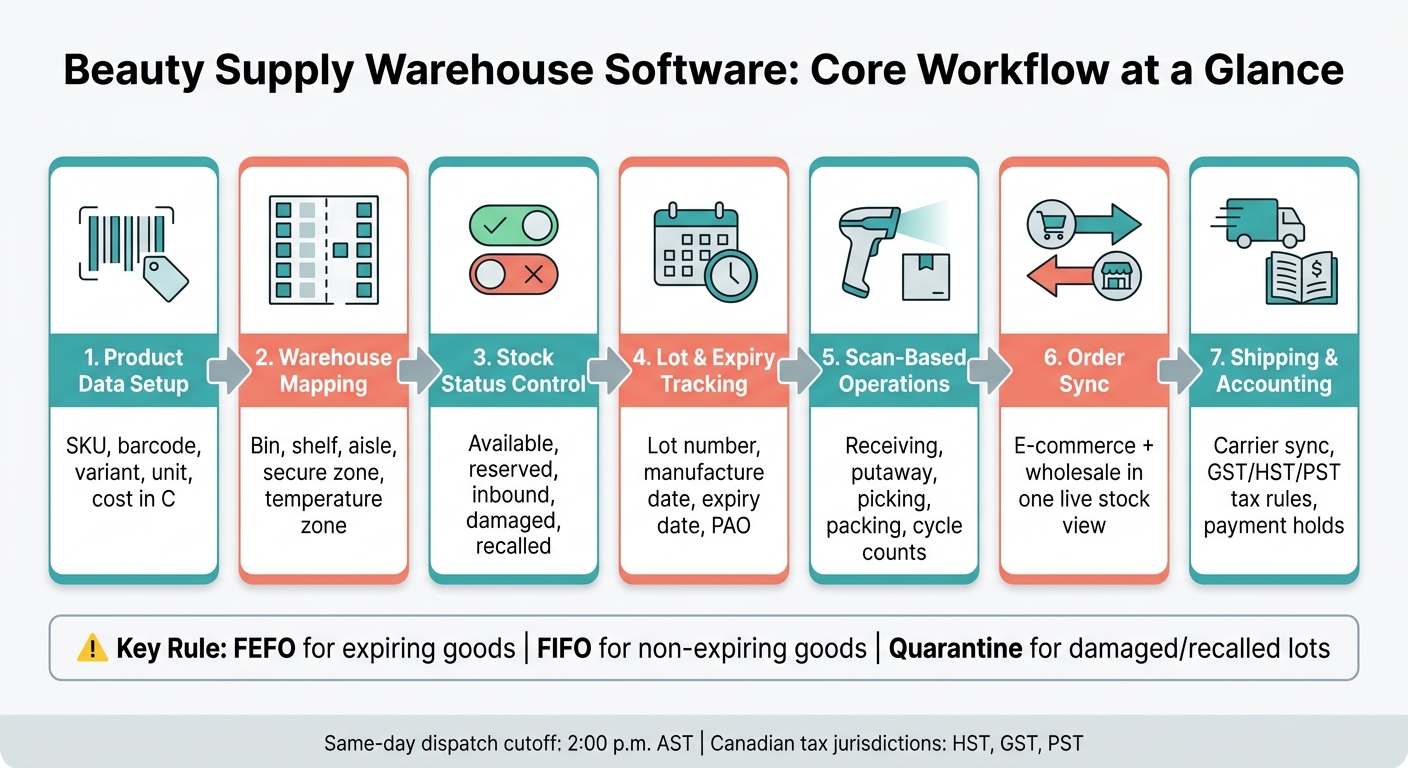
Beauty Supply Warehouse Software: 7-Step Workflow from Receiving to Dispatch
LOGIC ERP x Love Earth | Transforming Beauty & Cosmetics Warehouse Operations with ERP Software
sbb-itb-8ec3e54
Set up warehouse data for beauty supplies
Beauty supply warehousing depends on clean item, location, and lot data. These warehouses deal with products that come in different sizes, need different storage conditions, and require different handling steps. So the software acts as the control layer for every SKU, location, and stock rule.
Set up the data in this order: product records, locations, stock statuses and permissions, then reorder and shelf-life rules. That sequence matters. Each part depends on the one before it, and if you skip ahead, small gaps can turn into messy problems once orders start moving.
Create product records with SKU, barcode, variants, and unit details
Every SKU needs a complete record before it enters the warehouse. At a minimum, include brand, product name, barcode (UPC or supplier code), size, colour or shade where needed, unit of measure, case quantity, supplier, cost in C$, and selling price in C$. If you handle wholesale orders, add pack sizes too, so the system can calculate unit pricing on its own.
Variants need extra care. Nail and cosmetic lines often include shades that look almost the same on a shelf. Giving each shade its own SKU and barcode cuts down on mis-picks. The same idea applies to medical aesthetics supplies. Those records should include a sterile/non-sterile flag, because products can look identical while needing very different handling.
If a product has temperature or handling rules, add a handling notes field and connect it to the right storage area or monitoring process. That keeps the record in one place and gives receiving staff what they need right away, instead of forcing them to dig through separate files.
| Product Category | Key Variant Fields | Unit of Measure Examples | Special Record Fields |
|---|---|---|---|
| Nail Care | Shade/colour, bottle size | 10 ml, 15 ml, item | Flammable storage flag |
| Skincare (Backbar) | Size (8 oz, 16 oz, 1 gal) | ml, oz, case | Professional use designation |
| Medical Aesthetics | Sterile/non-sterile | Box of 100, single unit | Temperature sensitivity, restricted access |
| Spa Disposables | Ply, dimensions (2×2, 4×4) | Case, pack, item | Dry storage requirement |
| Equipment | Model, replacement parts | Item (serialised) | Fragile/electronic handling |
Once each SKU is defined, map it to a physical location and stock status.
Define locations, stock statuses, and user permissions
After the product records are clean, map the physical warehouse. Group locations by storage type: small-bin picking shelves for disposables, temperature-controlled shelving for serums and cleansers, secure zones for medical aesthetics supplies, and floor or pallet racking for equipment and furniture. Each bin, shelf, and aisle should have its own location code. That code drives receiving, putaway, and picking right inside the software.
Stock statuses should reflect what inventory looks like at any given moment. Common statuses include:
- available
- reserved (allocated to an open order)
- inbound (purchased but not yet received)
- damaged
- recalled
Permission controls protect the audit trail. Receiving staff should be able to log inbound shipments and confirm quantities. Picking and packing staff should be able to work from pick lists and confirm scans. Only management roles, such as a Director of Operations, should be able to make inventory adjustments or override stock statuses. When those changes are limited to approved roles, every update ties back to a named person and timestamp.
Set reorder rules, lead times, and shelf-life controls
Set reorder points based on demand and supplier lead times. A fast-moving disposable like 4×4 gauze facial sponges may need a much higher reorder point than a slower-moving item. A professional nail brand sourced internationally also needs a longer lead time buffer, so you don't run out while the shipment clears customs. These rules let the system trigger replenishment actions before fulfilment slips.
For products with a set shelf life, add a minimum remaining shelf-life threshold at receipt. If a lot falls short, the system flags it so it can be quarantined or returned before it moves into available stock. Pair that with safety stock levels for your fastest-moving SKUs, so one delayed shipment doesn't create an immediate fulfilment gap. With the master data in place, stock control can run by SKU, location, and lot.
Control stock by SKU, location, and lot
With clean master data in place, the software updates a single live stock record every time inventory moves. That cuts down on back-and-forth between a spreadsheet and the warehouse floor. It also means the system knows where each SKU sits at any given moment.
Track available, reserved, inbound, damaged, and recalled inventory
In a beauty supply warehouse, one distinction matters a lot: on-hand inventory versus available stock.
On-hand is the physical count. Available stock is what’s left after open orders have already reserved units. When e-commerce and wholesale orders move through the same warehouse, that gap matters. If the software doesn’t update fast enough, one channel can keep selling stock that’s already been promised somewhere else.
Once stock is split by status, location, and lot, the software can control what gets picked. When an order is confirmed, the system moves units from available to reserved. It should also track each SKU by lot and bin, so recalled, damaged, or short-dated stock stays separate.
That separation helps keep damaged, quarantined, or recalled stock out of circulation. It also gives tighter control over items that need extra care, such as sterile or temperature-sensitive products.
Use scans and cycle counts to cut manual errors
Every stock movement should be confirmed with a scan instead of manual entry. When staff receive a shipment, they scan the product barcode and the bin location. When they pick an order, they scan again.
That barcode-and-location check catches common warehouse mistakes, like picking the wrong item or pulling from the wrong bin. It also creates a clear audit trail for each movement.
Cycle counts replace the full warehouse count with a rolling process. Instead of stopping operations to count everything at once, staff count selected bins on a set schedule. If a count shows a variance, the system flags it for review before any adjustment is posted. Those same lot records then carry into expiry-date receiving and FEFO rotation.
Receive, store, and rotate stock by expiry date
Building on lot-level stock control, expiry tracking starts the moment stock hits the dock. At receipt, match the shipment against the PO, check SKUs and quantities, scan each item, and note any shortages, damage, or mis-picks. Once everything checks out, move accepted stock to its bin and mark it available.
Record lot numbers, manufacture dates, and expiry dates at receipt
A single SKU can arrive in more than one lot, each with a different expiry date. That happens all the time with lidocaine creams and serums. If your system only tracks quantity by SKU, those lots can get lumped together. And once that happens, FEFO rotation gets messy fast.
Capture lot data at receipt, including the lot number, manufacture date, and expiry date. For products with a period-after-opening (PAO) guideline instead of a printed expiry date, record that too, along with the manufacturer’s storage rules. Medical-grade or temperature-sensitive items also need a seal check and storage compliance check before release.
Once those fields are in place, the system can handle stock rotation on its own.
Apply FEFO rules and quarantine controls
After lot data is in the system, the software can use it to control what gets picked. FEFO (First-Expired, First-Out) tells pickers to use the lot with the nearest expiry date, no matter when it was received. FIFO (First-In, First-Out) still makes sense for non-expiring consumables like gauze sponges or cotton pads, where receipt date is the only sequence that matters.
| Rule | When It Applies | Warehouse Action |
|---|---|---|
| FIFO | Non-expiring supplies such as gauze sponges or cotton pads | Pick earliest-received stock first. |
| FEFO | Products with shelf lives such as lidocaine creams and serums | Pick the nearest-expiry lot first. |
| Quarantine | Damaged shipments, recalled lots, or temperature-compromised injectables | Block the lot until inspection or return. |
Use these rules to route stock before it reaches pick faces.
Near-expiry alerts give the team advance notice before a lot turns into a write-off. You can also set a minimum shelf-life rule to stop allocation when a lot falls below the threshold the warehouse accepts for sale. Expired or quarantined lots should stay blocked from both e-commerce and wholesale picking.
Pick, pack, and connect e-commerce with wholesale orders
Once stock is allocated, the next job is simple in theory and messy in practice: turn approved orders into clear pick lists that people can use right away, without clogging up the floor.
Generate pick lists and verify packing with scans
If lot and FEFO controls are already set, picking should pull the right stock first. But a strong pick list needs to do more than spit out item names.
It should show staff what to pick, how many to pull, and where to go first. That usually means grouping work by zone, priority, and carrier service, so the team isn’t zigzagging across the warehouse all day.
When you’re dealing with expiry-sensitive or medical-grade items like lidocaine creams or sterile dermaplaning blades, there’s not much room for guesswork. Scans should check the picked item, lot, and sterility status before the box is sealed. That gives the team a clean scan trail from picking into packing and then dispatch.
Wholesale and e-commerce orders should also feed into one picking queue. That makes it easier for staff to spot same-day dispatch orders, set priorities, and keep product moving without extra back-and-forth.
Sync order flow, shipping records, and stock updates
After picking, the same order record should carry through packing, dispatch, and tracking. In plain terms, the order flow should move from order entry to allocation, then picking, packing, dispatch, and tracking.
When an order is placed, the system should allocate stock right away. At the same time, live stock counts on product pages help keep customers aligned with what’s actually available.
For Canadian operations, it also helps to lock in shipping cutoffs, such as 2:00 p.m. AST, so same-day dispatch doesn’t turn into a scramble.
Device support for scanners, mobile devices, and workstations
Once stock rotation is tied to lot data, devices become the fastest way to keep every scan, label, and shipment record lined up. In a Canadian beauty supply warehouse, those devices need to sync inventory updates, labels, and shipping data in real time. Start with handheld devices on the warehouse floor. Then build out fixed packing stations.
Use mobile scanning for receiving, putaway, picking, and counts
Handheld scanners and mobile computers help staff handle receiving, putaway, picking, and cycle counts in one smooth flow. At receipt, workers can confirm lot numbers and expiry dates during the same scan process, which keeps lot-level records clean and cuts out manual re-entry.
That matters more than it may seem. If a team has to type lot details by hand after the fact, errors creep in fast. Real-time updates help stop overselling and keep stock counts in sync across channels.
Set up workstations for labels, packing slips, and shipping records
After scanning comes packing, and workstation speed has a direct effect on dispatch times. Packing stations take allocated orders and move them to shipped orders without manual re-entry.
A solid setup usually includes:
- a barcode printer
- a packing-slip printer
- a screen for order review and packing checks
It also helps to standardise date, time, and shipping record fields across every workstation. That way, records stay consistent no matter who packs the order. High-speed label printers help keep same-day dispatch on track. Role-based limits on order edits and shipping-rate changes also protect the audit trail and reduce accidental changes during busy dispatch periods.
Software features to look for in a beauty supply warehouse
Once your warehouse workflow is mapped out, compare software based on the controls it automates. Don’t settle for a generic inventory tool. Beauty supply warehouses deal with batch-sensitive products, product variants, and channel-specific order flow. The system you choose should keep receiving, lot control, and fulfilment in step from start to finish.
Core warehouse and inventory features to check
Start with the basics that matter day to day. Look for strong SKU and variant management, lot-level tracking with FEFO, bin location control, cycle counts, user permissions, and reorder rules you can adjust to fit your operation.
If those controls are weak, problems show up fast. A warehouse might know it has stock, but not which lot, which bin, or which expiry window should be used first. That’s where things get messy.
Ecommerce, wholesale, and accounting integrations to check
Once the inventory controls look solid, check how the software connects with sales, shipping, and accounting systems. This is where a lot of platforms stumble. Two-way sync matters. If stock updates lag, you can end up overselling across multiple channels before the system catches up.
The software should also support professional licensing verification. That way, restricted medical aesthetics supplies are shown only to verified professional accounts.
Use this checklist to compare integrations:
| Integration Area | What Should Sync | Why It Matters | Common Failure Points |
|---|---|---|---|
| Ecommerce (B2C/B2B) | Real-time stock levels, verified professional access | Prevents overselling; restricts medical-grade products to verified professionals | Lag in stock updates causing backorders; failed credential checks |
| Wholesale Order Entry | Bulk pricing, tiered accounts, pro credentials | Allows accurate order entry for sub-distributor partners while protecting margins | Slow account approvals; pricing tier mismatches |
| Shipping Systems | Tracking numbers, carrier rates, cutoff triggers | Supports same-day shipping for orders placed before regional cutoffs such as 2:00 p.m. AST | Missed carrier pickups from late label generation; incorrect rates for remote regions |
| Accounting | Payment status, provincial tax (HST/GST/PST), financing terms | Automates reconciliation for high-volume wholesale orders across provinces | Incorrect tax applied by province; financing terms not triggering order holds |
Watch provincial tax handling closely. Flat tax logic doesn’t work when orders move across HST, GST, and PST jurisdictions. The system should also track wholesale payment status and place orders on hold until funds clear. In a busy warehouse, that one setting can save a lot of cleanup later.
Conclusion
Once your data, stock controls, expiry rules, devices, and integrations are set, you're ready to move into live warehouse use.
Beauty supply warehouse software needs to do more than track inventory. It should control SKUs, stock status, lot expiry, FEFO picking, scans, and two-way order sync. This checklist helps confirm that the full receiving → putaway → picking → packing → sync workflow is ready before go-live:
| Step | What to Do |
|---|---|
| Catalogue accuracy | Verify SKU master data |
| Barcode readiness | Test barcode-to-SKU links |
| Receiving discipline | Capture lot and expiry data at intake |
| Expiry rules | Enable FEFO and quarantine rules |
| Staff permissions | Assign role-based access |
| Integration testing | Test two-way order sync |
| Device setup | Verify scanner and mobile device readiness |
| Opening stock audit | Count and verify all on-hand inventory before go-live |
When those checks are done, you can go live with a clean, scan-based workflow.
FAQs
How does inventory software prevent overselling?
Inventory software helps stop overselling by updating stock levels in real time as sales and treatments happen. When a retail product is sold, the system deducts it automatically at checkout.
For back-bar supplies, consumables are tied to service protocols, so staff can track the exact amounts used. Low-stock alerts also help the team sell only what’s physically on hand.
When should a warehouse use FEFO instead of FIFO?
Use FEFO instead of FIFO for products with expiry dates, shelf life, or batch and lot rules. FEFO means first expired, first out. In plain terms, staff use or ship the items that expire soonest first.
That matters most for backbar perishables and batch-tracked items, like organic products or medical-grade skincare. If you stick with FIFO alone, you can run into a simple problem: older stock may not be the stock that expires first.
Your inventory software should track batch numbers and send expiry alerts. That way, staff can spot what needs to move first and avoid using or shipping expired inventory. The goal is simple: less waste, fewer stock issues, and better control over products that can’t sit on the shelf for too long.
What should be tested before go-live?
Before go-live, make sure staff know how to scan items for receiving, transfers, and point-of-sale. That sounds basic, but it’s where small mistakes can snowball fast.
Check your digital records too. Serial numbers, product categories, storage locations, and QR code mapping all need to match what’s on the floor. If that data is off, the system won’t give you a clear picture of what you have or where it sits.
It’s also smart to test low-stock alerts before launch. You want to know they fire at the right time, not after you’ve already run into a stock issue.
For temperature-sensitive items, confirm that your monitoring hardware and software integrations are working as expected. And make sure batch numbers and regulatory documents are being tracked properly, so the system stays audit-ready.
Leave a comment